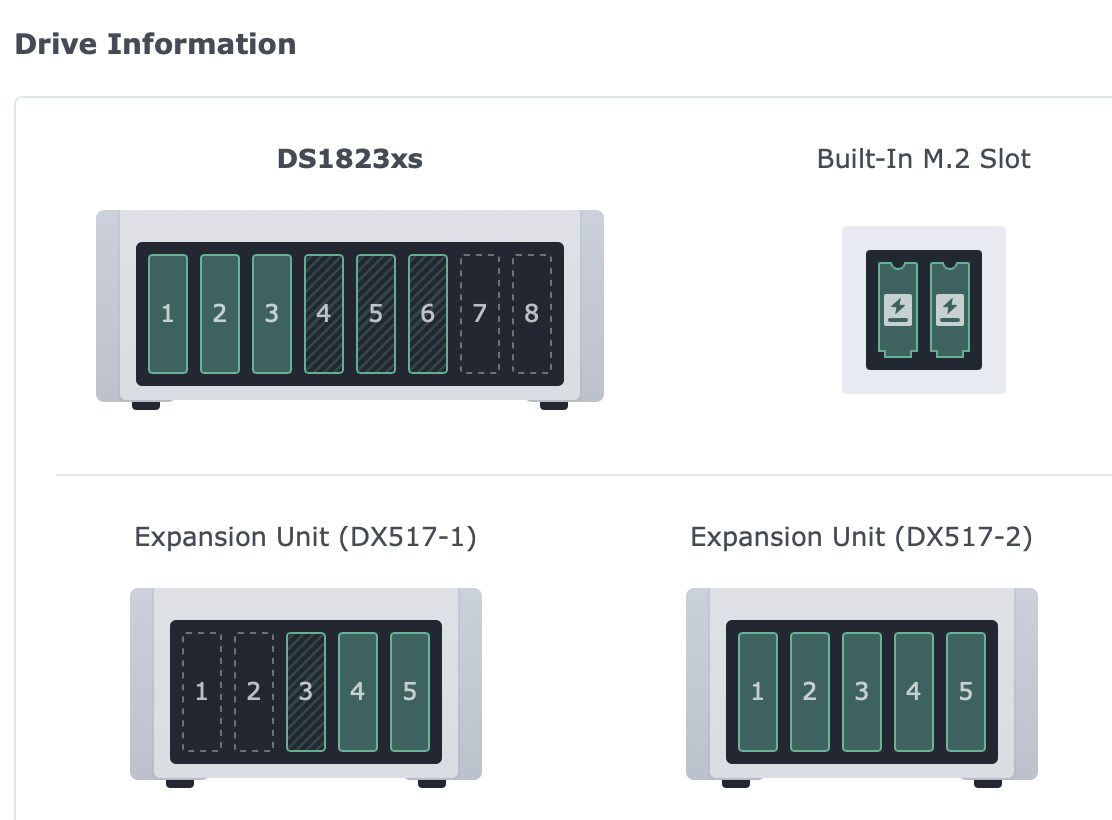
This is the operating record for the DS1823xs+ that holds Milo-Ark and the rest of the house data. The 8×8 TB RAID 5 layout is gone. The chassis is the full 8×24 TB RAID 6 set (convert finished; post-reshape data scrub complete). The DX517 keeps the old 8 TB disks as a mounted local backup tier — not a second site.
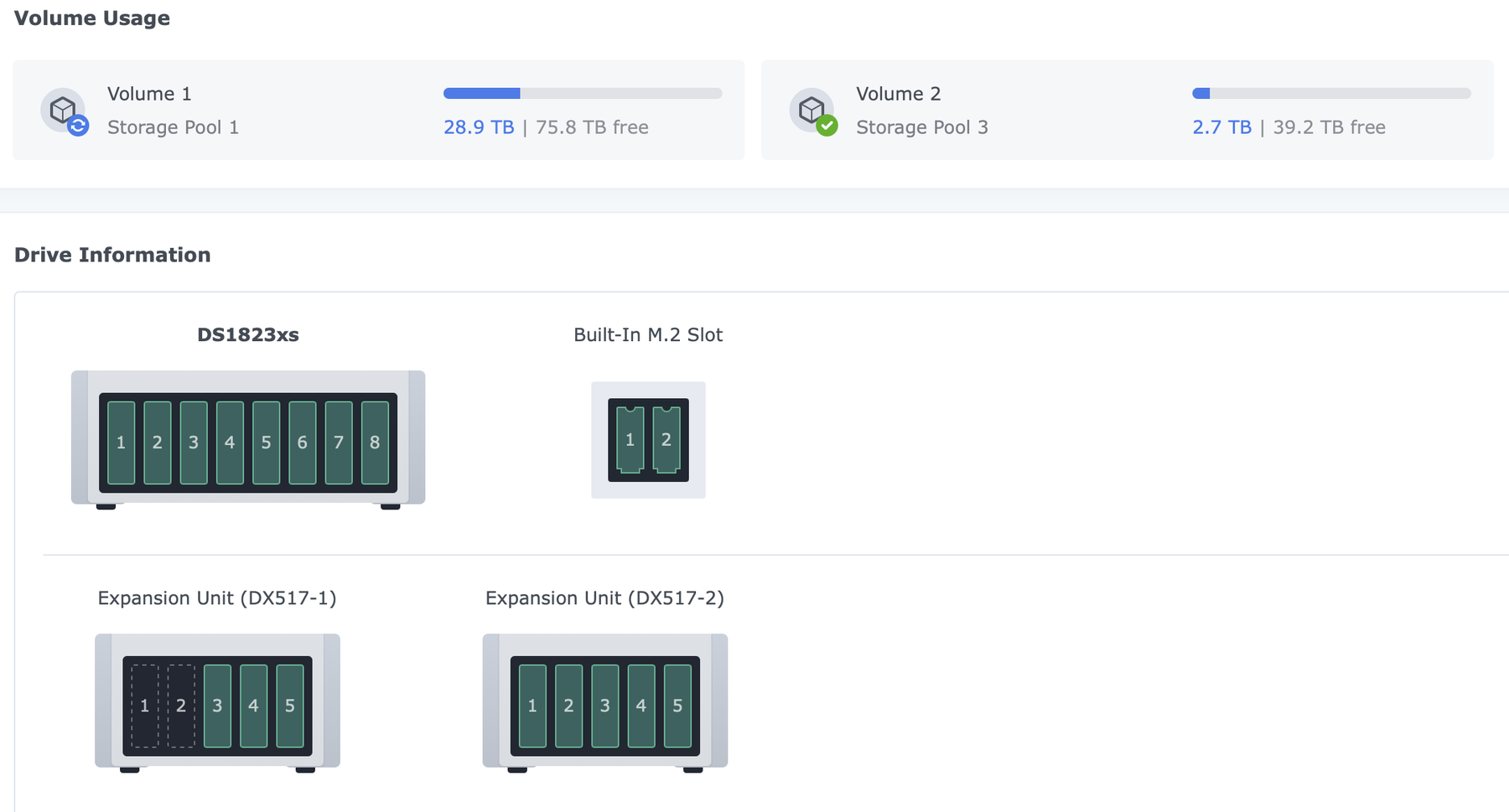
RAID 6 convert complete (August 18, 2026)
The Pool 1 RAID type change finished successfully. Storage Pool 1 is Healthy RAID 6 on all eight chassis 24 TB members. Volumes are green. A full data scrub on Pool 1 is in progress now that the pool is no longer busy with the reshape.
| Pool | Members | RAID | Capacity (how to read it) | Status (Aug 18) |
|---|---|---|---|---|
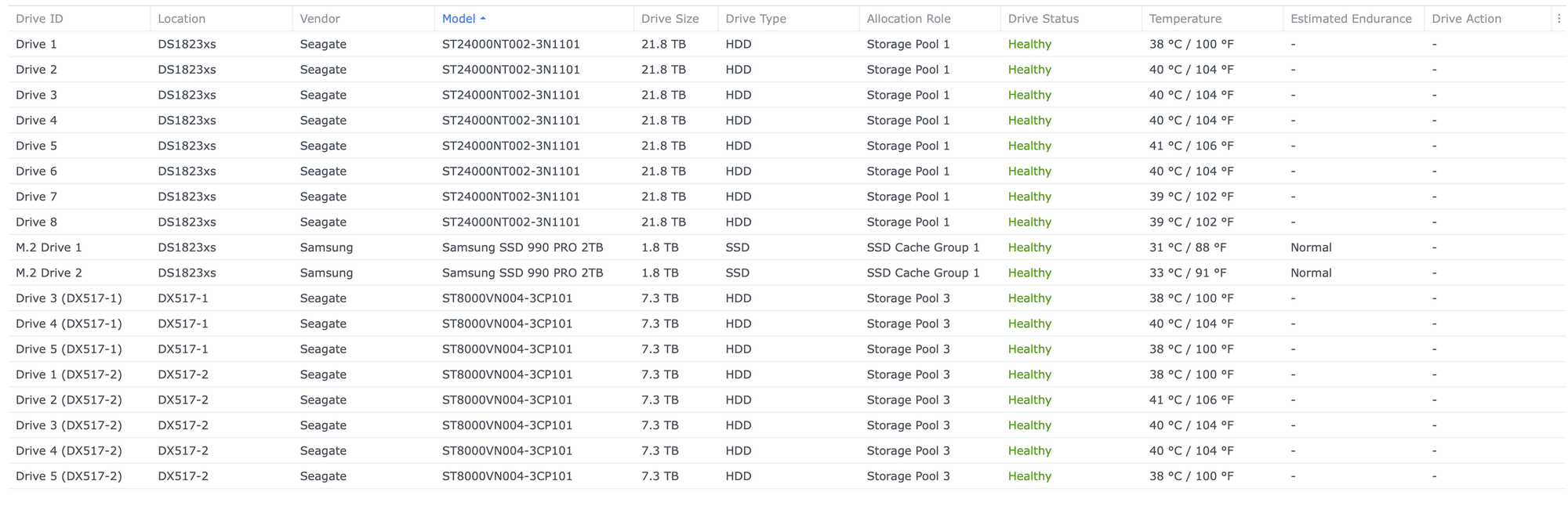
| Storage Pool 1 | 8× Seagate ST24000 (~21.8 TB each in DSM) | RAID 6 | Usable ≈ 6 × ~21.8 TB ≈ 130 TB — not 6×24=144 sticker math; two disks are parity | Healthy · data scrub complete |
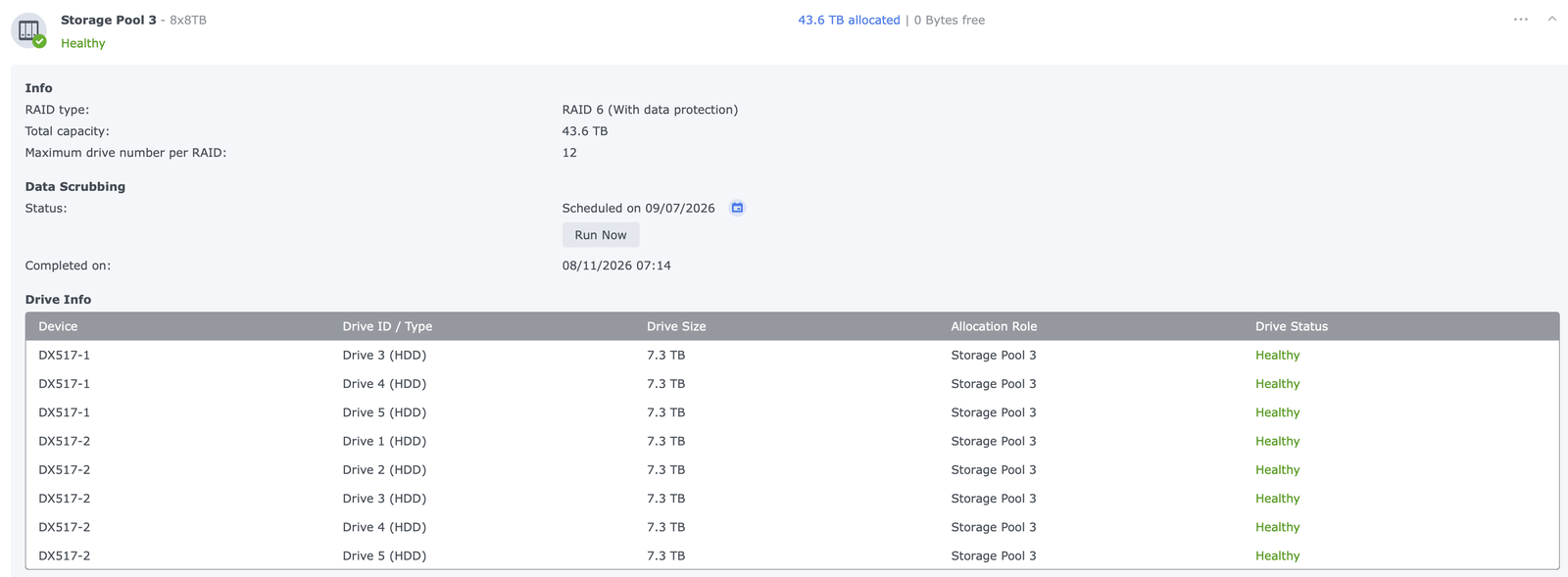
| Storage Pool 3 | 8×8 TB on DX517 | RAID 6 | ~43.6 TB pool (Vol2 HB backend) | Healthy |
| SSD cache | 2× Samsung 990 PRO 2 TB M.2 | RAID 1 group | ~1.8 TB cache → Vol1 | Healthy |
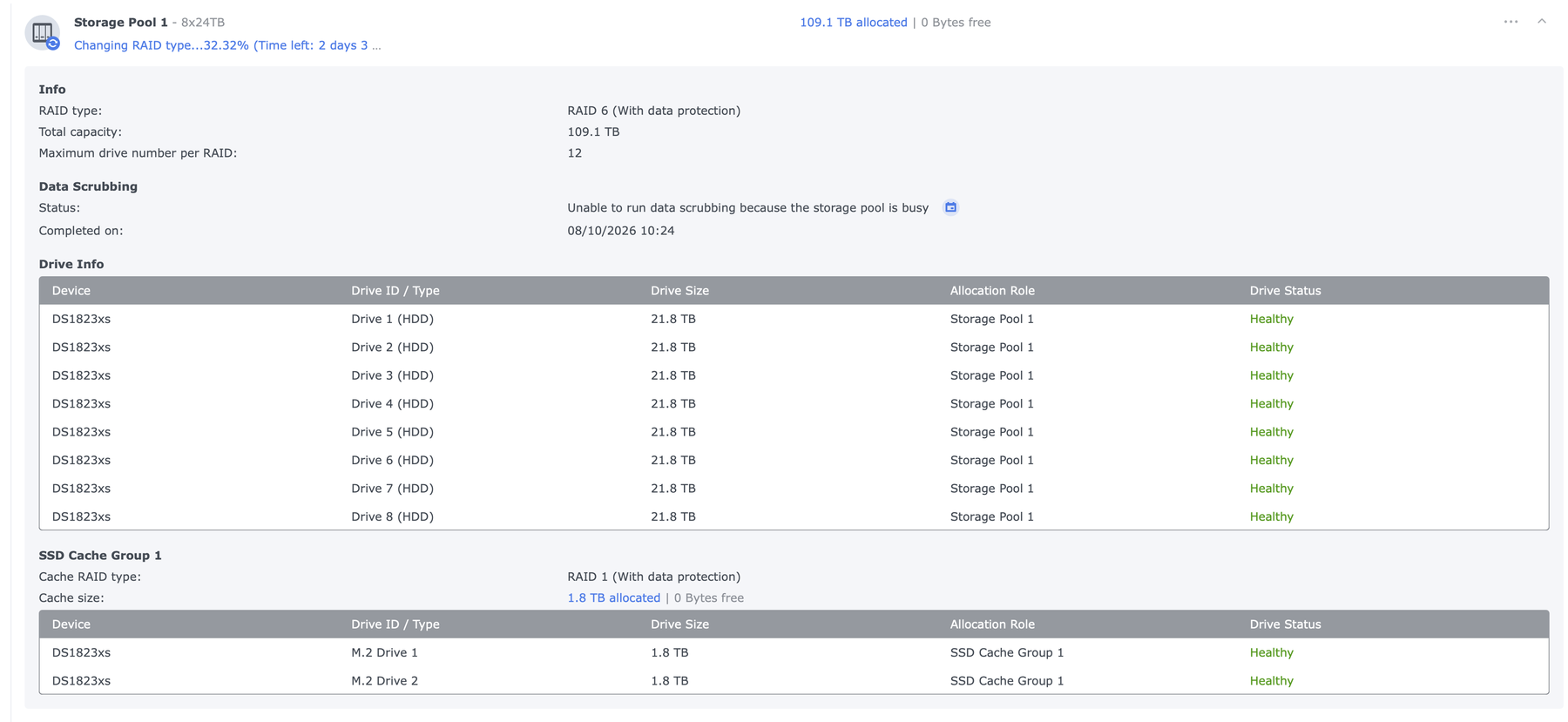
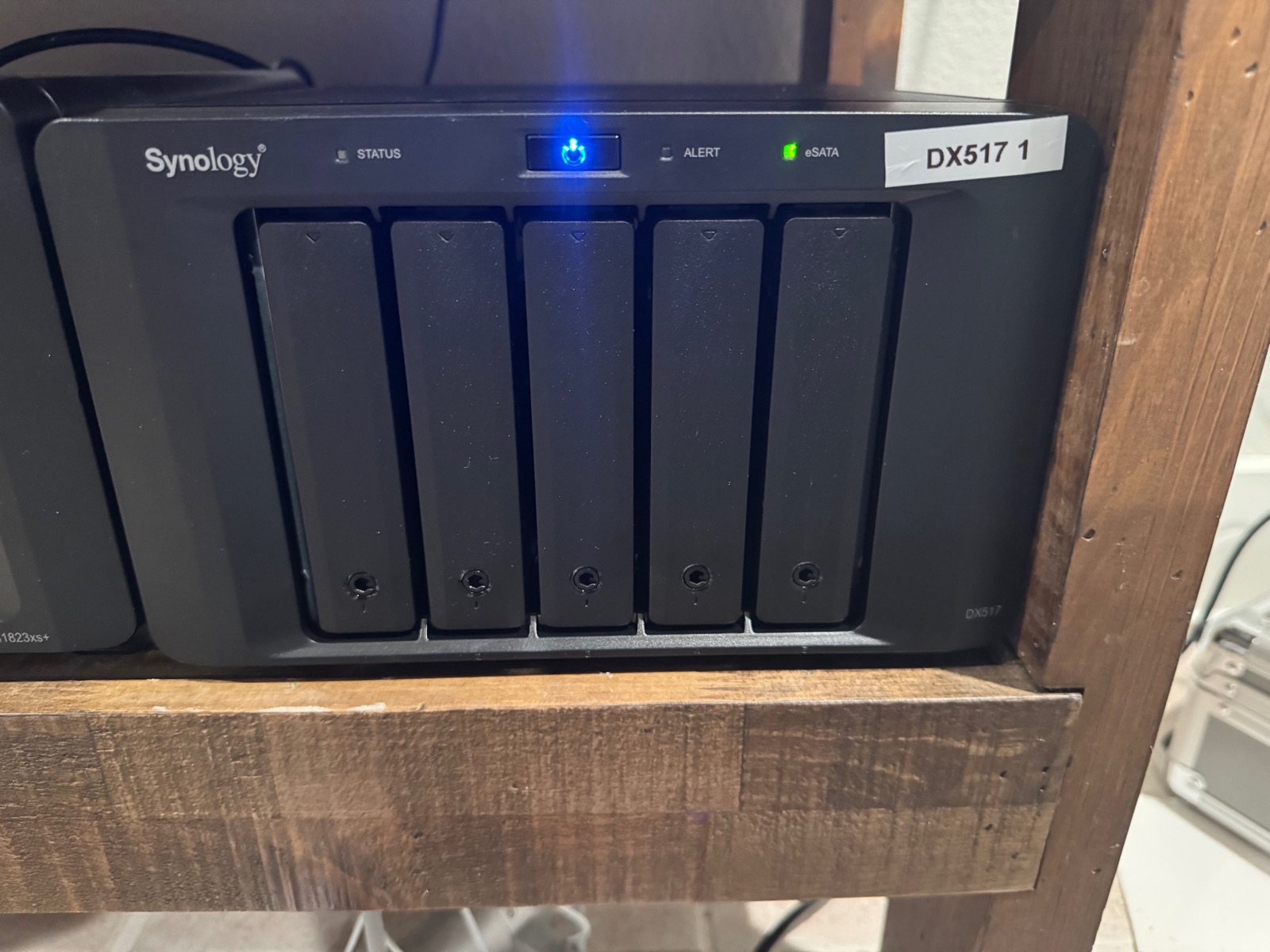
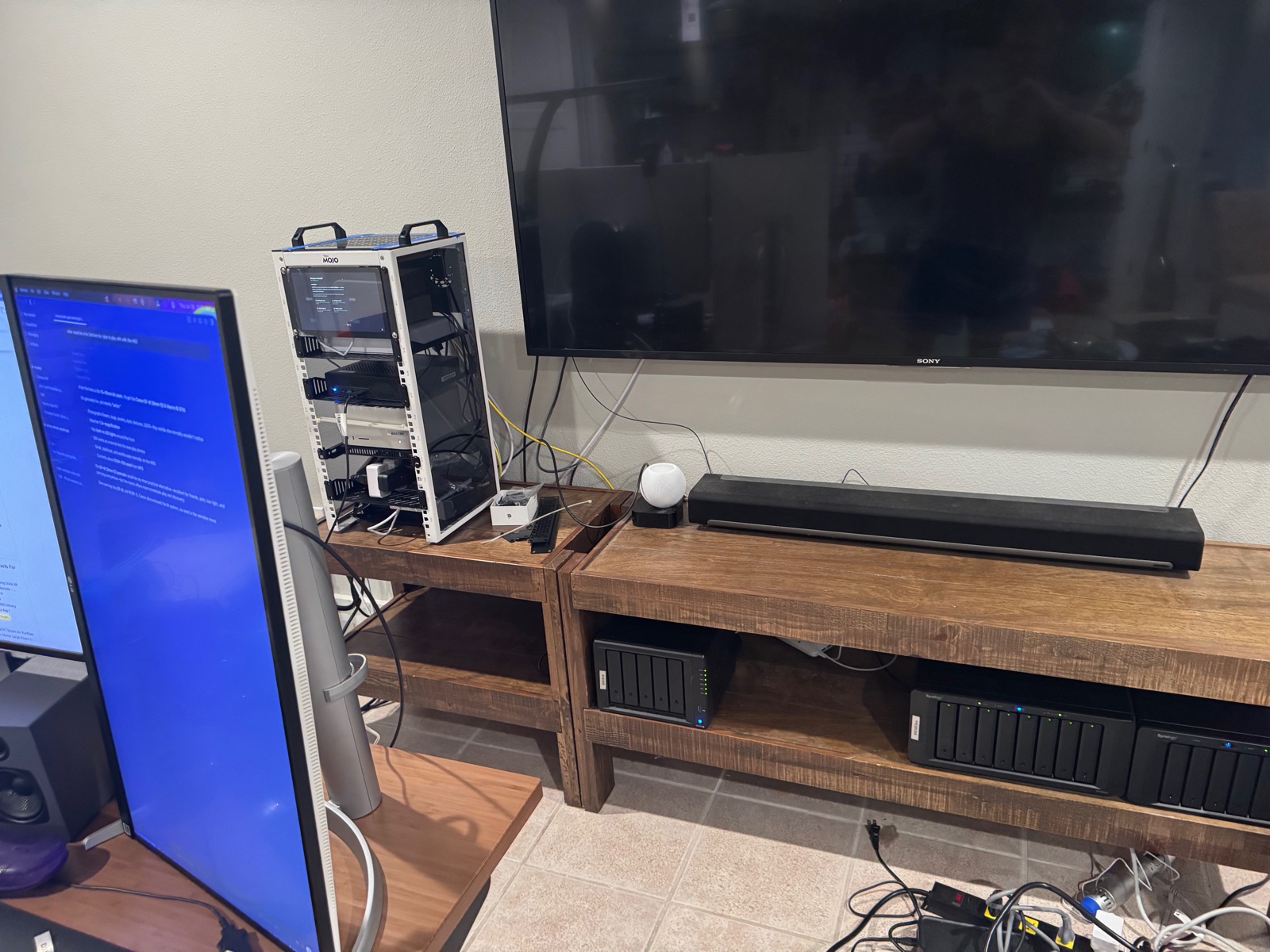
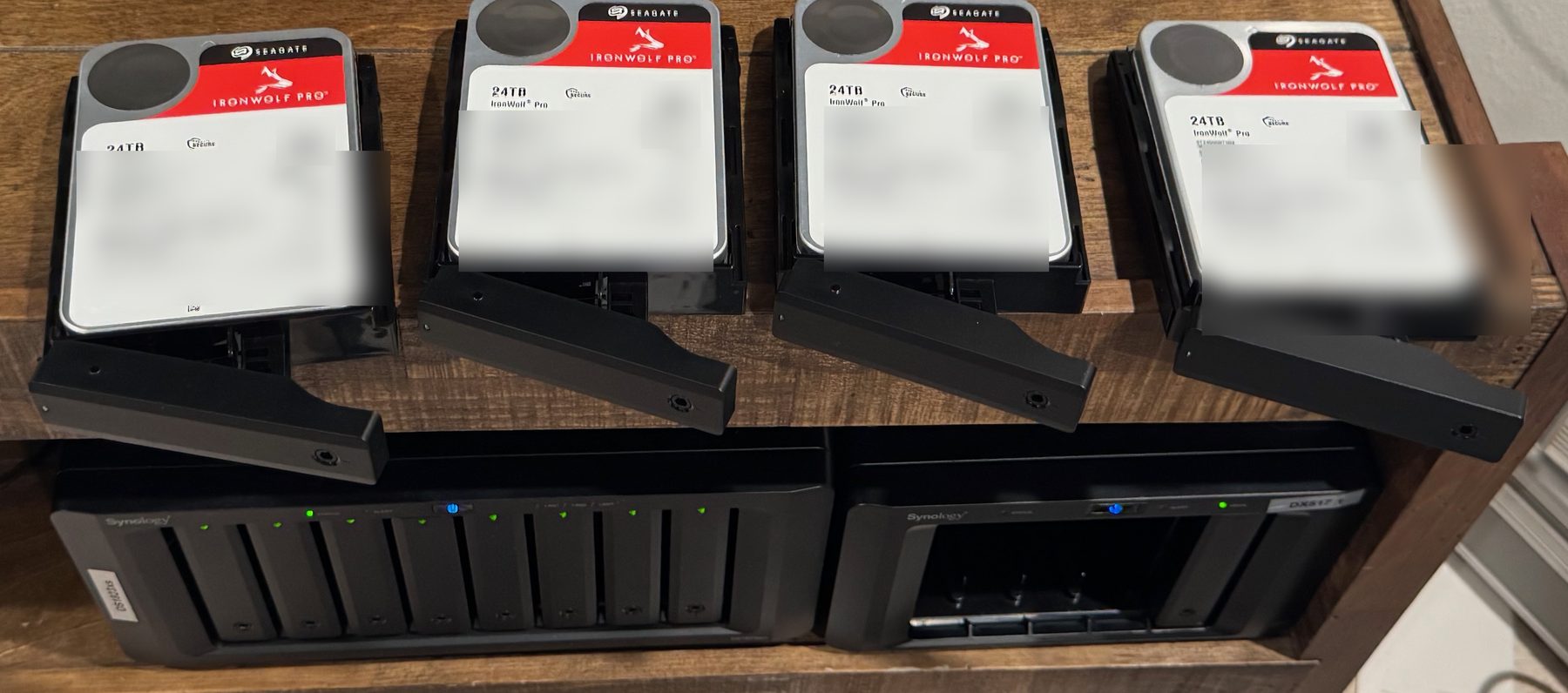
Historical mid-convert snapshots (Aug 15 ~32% / ~2d 3h ETA, drive inventory, Pool 3 detail) remain below as provenance.
Provenance — mid-convert (August 15)
UPS / NUT (August 18, 2026) — tested & working
Power protection closed after live wall-pull drills. Chain: Eaton 5PX USB → Forge NUT master → SNMP/NUT clients on the LAN.
| Role | Host | How | Timer / policy | Test result |
|---|---|---|---|---|
| UPS | Eaton 5PX 3000 RT2U G2 | USB → Forge | — | Live OB DISCHRG on pull |
| NUT master | Forge (MS-01, 192.168.1.19) | usbhid-ups + upsd + upsmon master; SNMP bridge :161; UFW allows NUT :3493 + SNMP from NAS clients | On-battery 8 min via upssched; nut→sudo halt | Pass |
| NAS client | DS1823xs+ (.21) | DSM UPS → SNMP → .19 | Standby after 5 min | Pass |
| NAS client | DS1019 (.23) | DSM UPS → SNMP → .19 (UFW 3493/tcp + 161/udp) | Standby on battery (DSM) | Working |
| M4 Max | Desktop | NUT slave → eaton5px@192.168.1.19 | On-battery 2 min | Working (conf perms + macOS /sbin/halt) |
/etc/sudoers.d/nut-shutdown. M4: upssched as nobody needs readable conf + sudoers for /sbin/halt. DS1019 added same evening with matching SNMP hole on Forge.Architecture at a glance
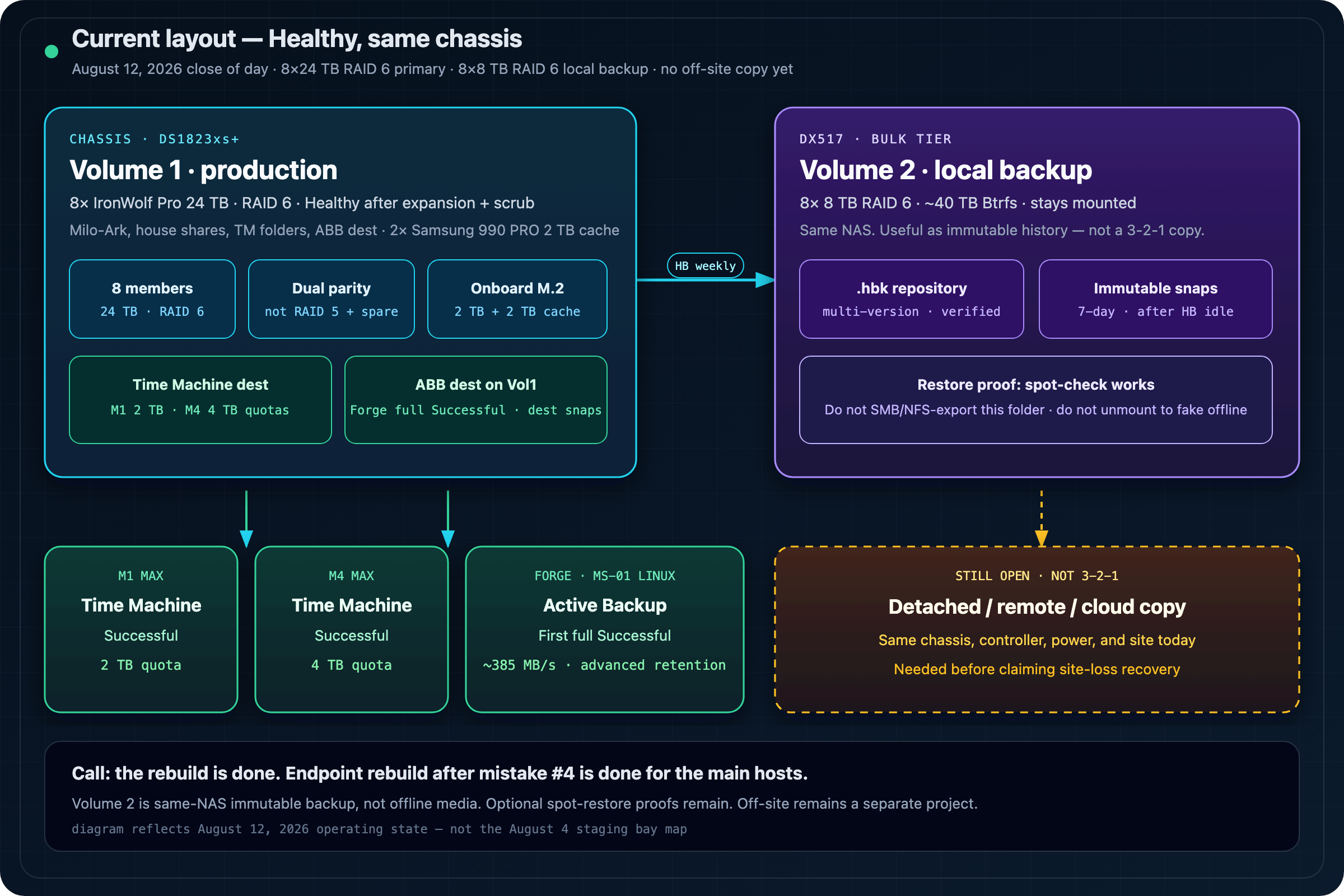
| Layer | Layout | Role | Status |
|---|---|---|---|
| Pool 1 / Volume 1 | 8×24 TB · RAID 6 converting | Primary data, Milo-Ark, TM + ABB dest | ~32% · 109.1 TB pool · ETA ~2d 3h |
| Volume 2 (Pool 3) | 8×8 TB RAID 6 · 43.6 TB | Local versioned backup repository | Healthy · weekly HB + immutable snaps |
| M.2 | 2× Samsung 990 PRO 2 TB | Volume 1 SSD cache | Live |
| Endpoints | Time Machine + ABB Physical Server | Mac desktops + Forge Linux | M1/M4 TM 2/4 TB + Forge ABB Successful |
| Separate copy | Detached, remote, or cloud | Chassis / site-loss protection | Still required for true 3-2-1 |
Backup contract
Calling Volume 2 “offline” would be dishonest while it stays attached to the same NAS. The useful design is same-NAS immutable backup: Hyper Backup keeps historical versions; Snapshot Replication wraps the mutable .hbk with a short tamper-resistant window.
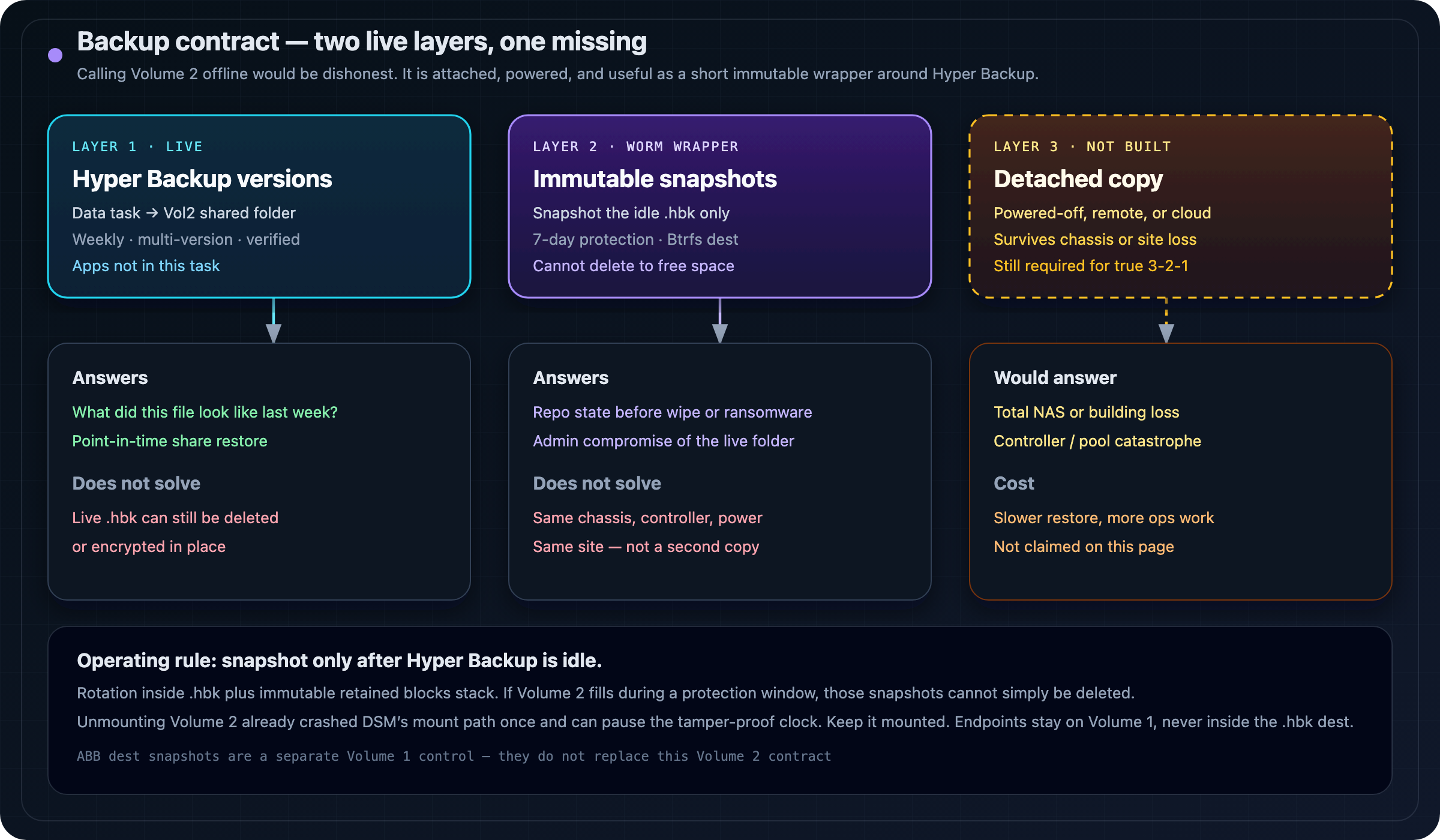
| Layer | Answers | Does not solve |
|---|---|---|
| Hyper Backup versions | What did this file or share look like last week? | The live .hbk can still be deleted or encrypted. |
| Immutable Btrfs snapshots | What did the whole repository look like before wipe, ransomware, or admin compromise? | Same chassis, controller, power, and site. |
| Detached / off-site copy | How do we recover after total NAS or site loss? | Usually slower and more operationally expensive. Not built. |
As-built Volume 2
| Control | State August 11–12 |
|---|---|
| Hyper Backup | Data task → dedicated Volume 2 shared folder; multi-version; weekly; verification Successful |
| Applications | Not selected in this task |
| Restore proof | Spot-check restore works |
| Immutable snapshots | Volume 2 destination only; after HB idle; 7-day protection |
| Mis-place | First share Hyperbackup-Snapshot landed on Volume 1 and locked; rebuilt on Volume 2; Vol1 leftover ages out |
| Old Vol1 HB task | Retired after the Vol2 path was proven |
| Not claimed | Off-site / detached 3-2-1 copy |
Safe starting policy
| Control | Pilot setting | Why |
|---|---|---|
| Hyper Backup | Nightly or weekly, multiple versions, Smart Recycle, critical shares first | History without assuming all of Volume 1 fits. |
| Immutable snapshot | Once daily, after Hyper Backup is idle | Do not snapshot a mutating .hbk. |
| Protection period | 7 days initially | Low end of Synology’s 7–14 day band; measure growth first. |
| Free-space reserve | 8–10 TB on the ~40 TB volume | Rotation plus retained snapshot blocks stack. |
| Integrity | Regular index checks; time-bounded data checks | Full checks on large repos can block other backup work. |
.hbk, while immutable snapshots can keep the Btrfs blocks that rotation deleted. If Volume 2 fills during an immutable window, those snapshots cannot simply be deleted. Synology’s tamper-proof clock can also extend protection after shutdown, unmount, filesystem check, optimization, drive migration, or whole-system restore.Do not routinely unmount Volume 2. We already tested that road. DSM offered no clean remount, marked the volume Crashed, and forced a manual cachedev recovery even though the RAID stayed healthy [UUU]. Unmounting also pauses the tamper-proof clock. Mounted-at-rest plus immutable snapshots is the appliance-native model.
Supported path
- DS1823xs+ is on Synology’s immutable-snapshot model list; this unit was already on DSM 7.3.2 (needs 7.2+).
- Volume 2 and the destination shared folder must be Btrfs.
- Use a Hyper Backup Data task. Same-NAS local folders are not an Entire System destination.
- Confirm Hyper Backup, Snapshot Replication, and Replication Service versions before enabling protection.
- Do not expose the backup repository through SMB or NFS.
Endpoint rebuild
Mistake #4 deleted Time Machine and machine backups to reclaim space. With the NAS healthy again, those paths were rebuilt on purpose:
| Host | Method | State | Notes |
|---|---|---|---|
| M1 Max | macOS Time Machine → NAS share (Bonjour / SMB) | Successful | Volume 1 TM share; 2 TB quota; encryption off |
| M4 Max | macOS Time Machine → NAS share | Successful | Volume 1 TM share; 4 TB quota; encryption off |
| Forge (MS-01) | Active Backup for Business · Physical Server (Linux + synosnap) | First full Successful | abb-cli -c pair; advanced retention; dest snaps; ~385 MB/s class |
Forge / ABB Linux lessons
- Kernel gate: a 7.0-class kernel broke
synosnapDKMS. Boot 6.8.0-137-generic. - Secure Boot: disabled on this host for the out-of-tree module (home-lab tradeoff).
- Pairing direction: Linux is not “Add device by IP” in DSM. Install the agent, then
sudo abb-cli -c -a <NAS-IP> -u <admin>. DSM’s Add Device dialog only points at the package. - Template defaults: first connect applied entire-device backup, weekday 03:00, compression/encryption on, and keep-all versions. Set a finite policy before fulls pile up.
- Destination rule: ABB data stays on a Volume 1 Btrfs share. Volume 2 is Hyper Backup
.hbk+ immutable snapshots only.
What the rebuild taught us
| Mistake | What happened | Durable rule |
|---|---|---|
| #0 — RAM gate | 8×24 RAID 6 as one volume exceeded DSM’s 108 TB class limit at stock memory. | Check the model volume ceiling before buying disks. This layout needs 32 GB. |
| #1 — Entire System + PARK | Entire System included every online volume, so parking data sideways did not shrink backup scope. | Use a folder-scoped Data task when another volume must stay out. |
| #2 — Safe Eject | Safe Eject removed the pool from DSM; recovery required Online Assemble. | Safe Eject is for removing a shelf, not hiding a volume from backup. |
| #3 — unmount crash | RAID stayed clean; DSM called the unmounted volume Crashed and offered no normal mount path. | Check mdstat, LVM, blkid, and cachedev_* before Remove / Repair / Create. |
| #4 — endpoint copies | Time Machine and machine backups were deleted mid-migration to reclaim space. | Delete replaceable caches first; restore endpoint backups promptly. Closed August 12 for M1, M4, and Forge. |
Unverified drive warnings
DSM labeled healthy IronWolf and Samsung devices Unverified until the community 007revad/Synology_HDD_db tool. Setting support_disk_compatibility="no" in both Synology config files unblocked operations but did not reliably clear the red badge. HDD_db v3.6.137 injected the observed models into the host and DX517 databases, then triggered a compatibility recheck.
cd /volume1/_admin_scripts/Synology_HDD_db-3.6.137
./syno_hdd_db.sh -n

# rollback
./syno_hdd_db.sh --restore- Unverified is not the same as failed SMART.
- Never initialize or remove a pool merely to clear a compatibility warning.
- Re-check after major DSM upgrades.
- This is a community tool, not Synology-supported software.
Historical migration map
Sources
- Synology: What is an immutable snapshot?
- Synology: Snapshot Replication — snapshots
- Synology: local shared-folder multi-version Hyper Backup
- Synology: Hyper Backup technical specifications
- Synology: models supporting immutable snapshots
- Synology: Hyper Backup integrity checking
- Synology: tamper-proof clock and extended protection
- Synology: Active Backup for Business — Linux physical servers
Companion: Milo-Ark — local AI model archive. That page remains inventory and checksums; storage operations stay here.